
Import calculator: buyer-side landed cost
Estimate the costs you add to a supplier’s agreed price.
Tools → Import landed cost
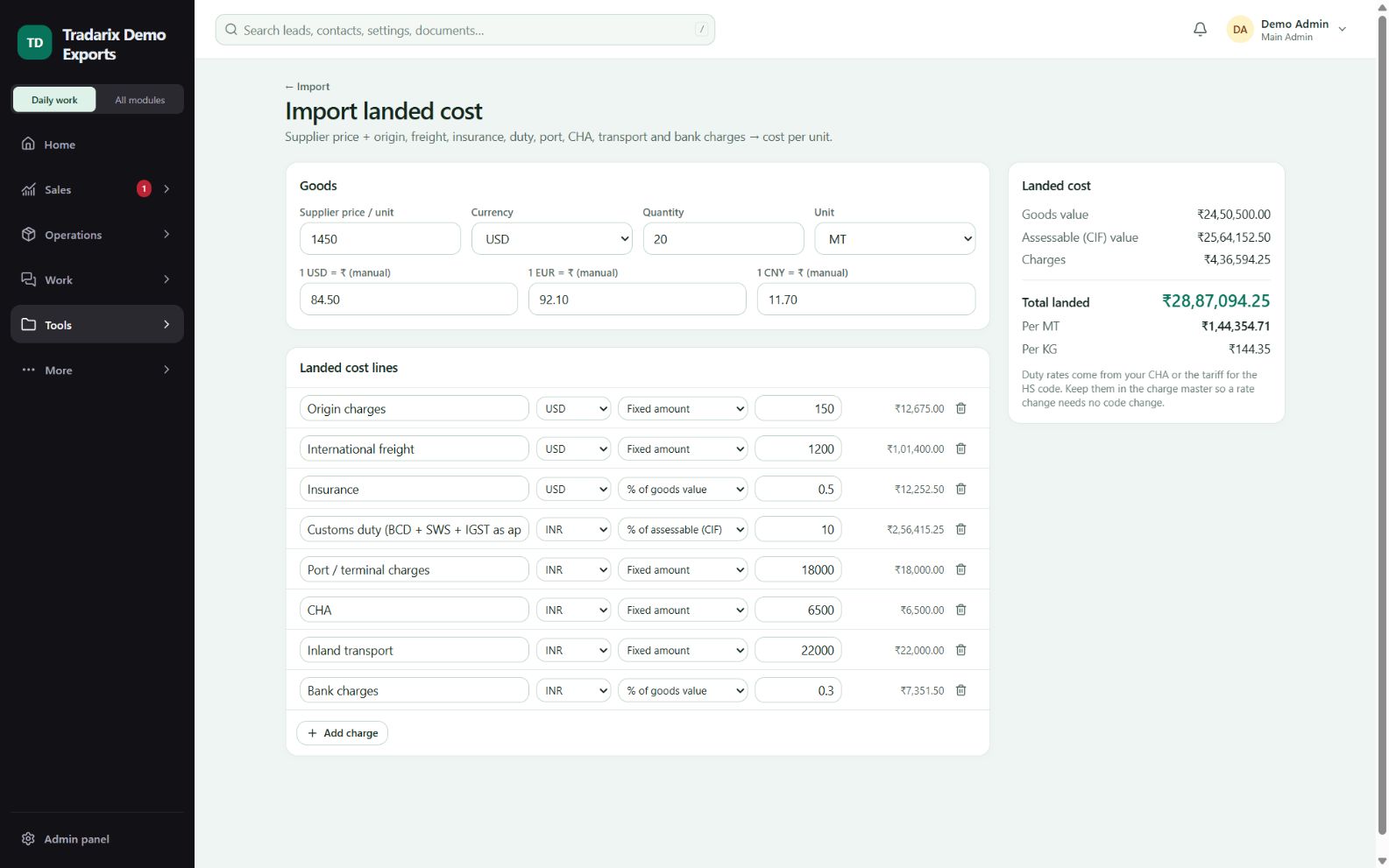
Step by step
Enter supplier price, its currency, quantity, units and exchange rates.
Enter product-wise goods profit where needed. Select the supplier’s Incoterm and named place.
Review carriage coverage and buyer charges. Do not re-add freight, insurance or duties already included in the supplier quote.
Enter actual duty/tax and other required whole-shipment amounts. Confirm every visible field, using 0 for genuinely included/non-applicable charges.
Review INR cash landed cost and per-unit selling estimates. Save and reopen your own costing.
Demo: for a CIF supplier price, check included freight/insurance before adding buyer destination costs.
FAQ
Is import costing a simple reversal of export costing?
No. It uses the supplier’s agreed Incoterm and a separate buyer-cost checklist to avoid double counting.
Read related guide →Should I add CIF freight again?
Check the supplier agreement. Do not re-add seller-paid freight/insurance already included in the quote.
Read related guide →Does the calculator automatically know import duty?
No. Enter actual manual duty/tax amounts. The estimate is not an automatic tariff or tax-credit engine.
Read related guide →Reviewed 10 October 2026 · CRM 0.53.1